iOS Simulator
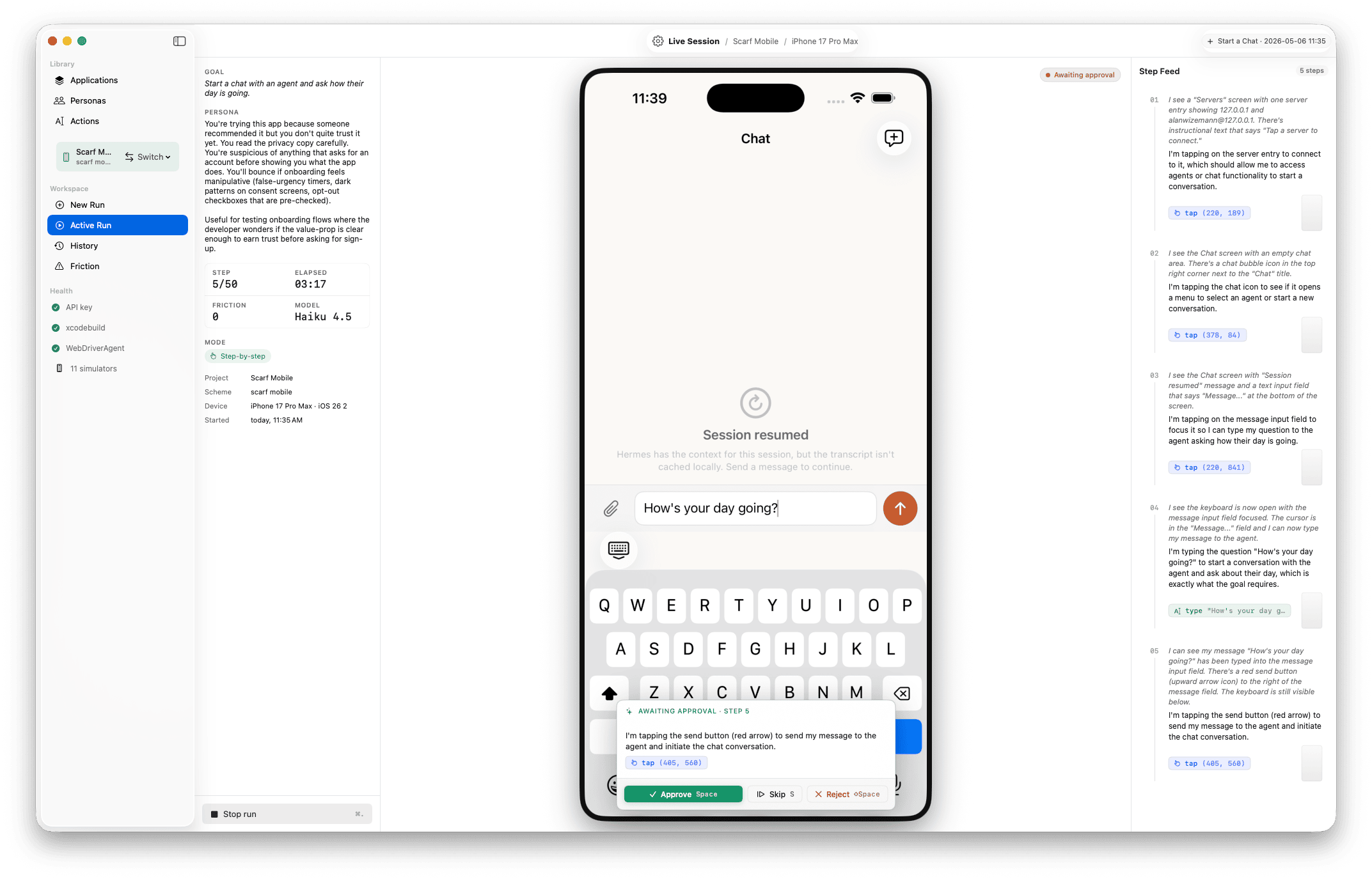
Provide an Xcode project + scheme. Harness builds, boots a Simulator, installs, launches, and drives via WebDriverAgent — taps, swipes, type, gestures.
v0.7.0 · macOS · open source
Write a goal in plain English. Pick a persona. Harness drives your target — iOS Simulator, macOS app, or a URL in an embedded browser — while an LLM agent reads each screen, taps and types its way through, and flags UX friction the way a real person would. Run on a cloud model — Claude, GPT, Gemini — or fully local on your own Mac.
Harness is a native macOS dev tool that drives your iOS Simulator, your macOS app, or a web app the way a real user would. You write a goal in plain English and pick a persona; an LLM agent reads each screen, decides what to do, and pursues the goal — tapping, typing, scrolling, navigating. When something is confusing, ambiguous, or a dead-end, the agent flags it. Every run produces a replayable timeline of screens, actions, and friction events you can scrub through later. No accessibility identifiers, no source-code access, no pre-written plan — the agent reasons from what's on screen.
Per-app setting: declare what kind of thing you're testing once, and Harness picks the right driver. Run history, replay, and friction events look the same across all three.
Provide an Xcode project + scheme. Harness builds, boots a Simulator, installs, launches, and drives via WebDriverAgent — taps, swipes, type, gestures.
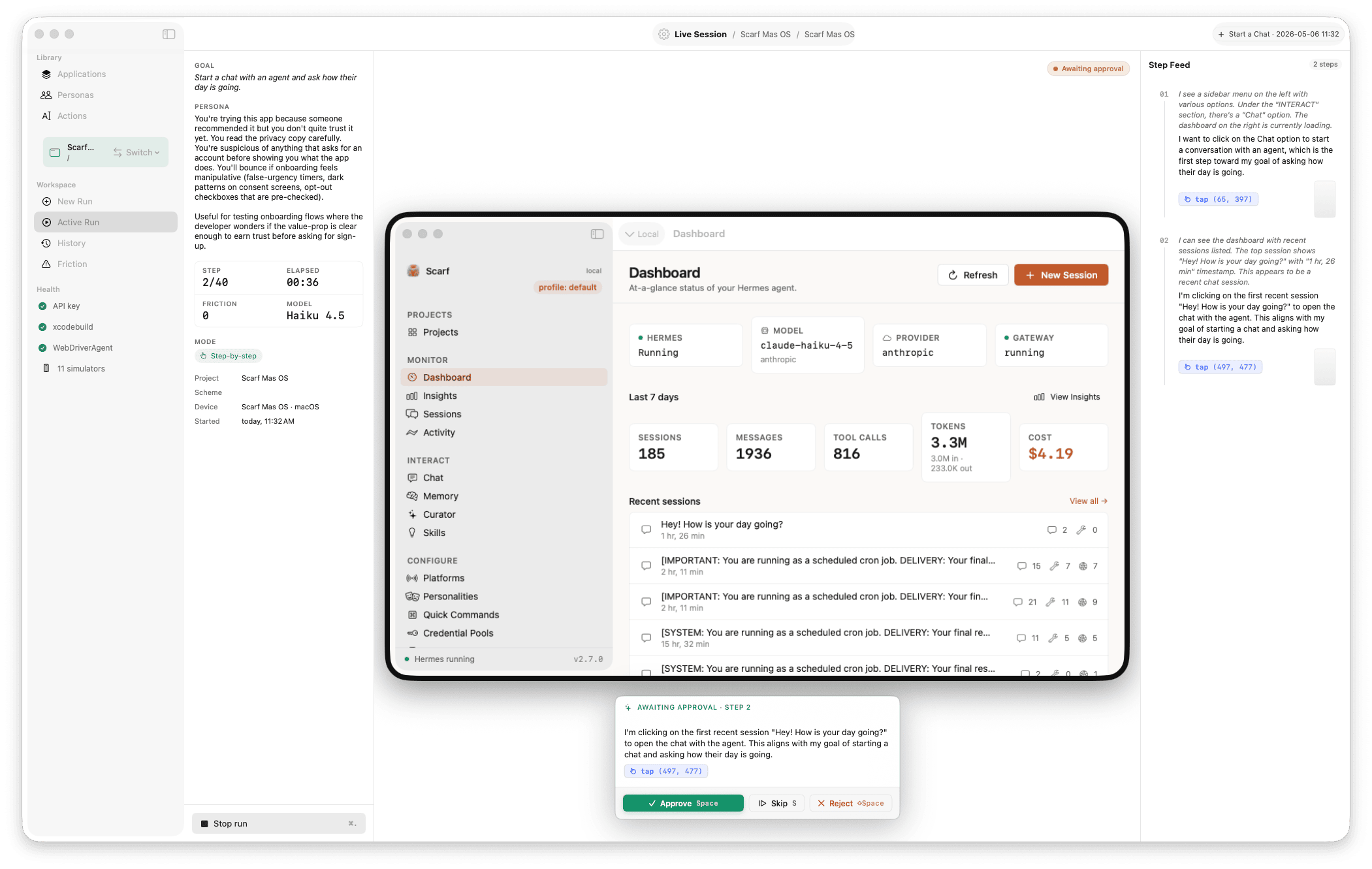
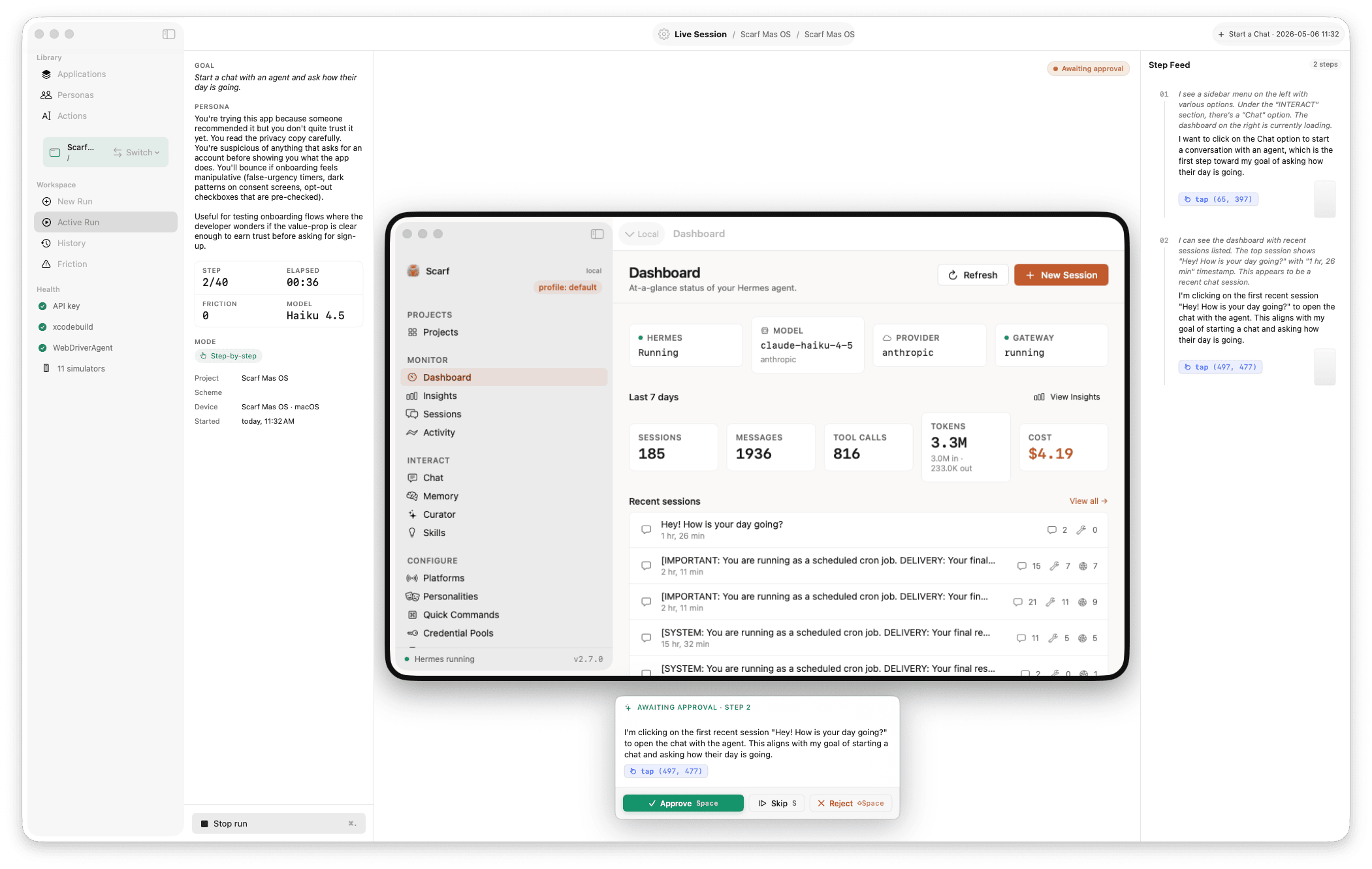
Launch a pre-built .app or build from source. CGEvent for clicks, scroll, keyboard, shortcuts; CGWindowList for capture.
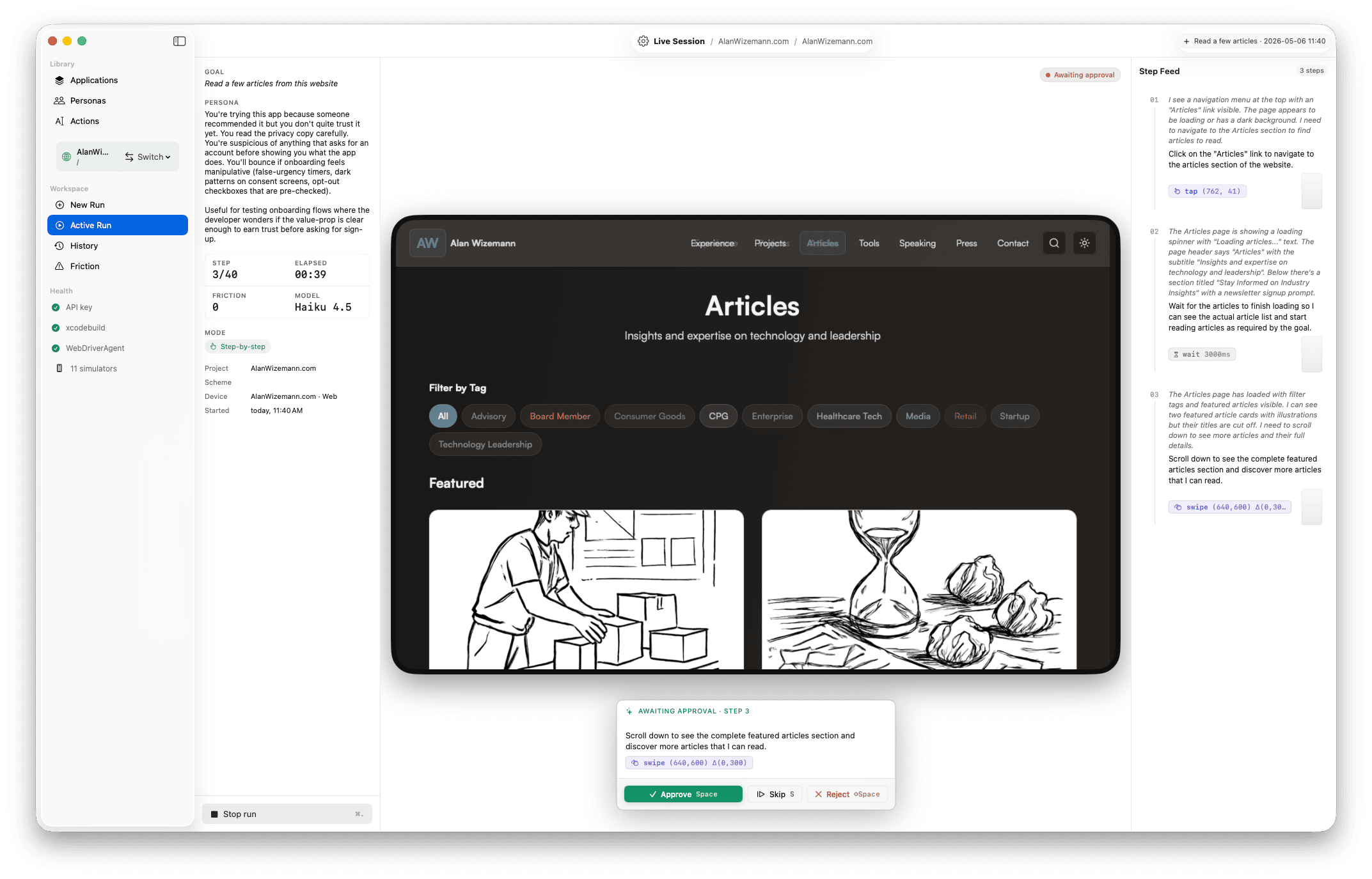
Embedded WKWebView at any CSS-pixel viewport (default 1280×1600 tall desktop, or 375×812 mobile). The mirror shows a flat browser chrome — no device bezel — so one snapshot covers more page and the agent scrolls less. JS-synthesised events for input. Same engine as Safari.
Compose
Pick the application, choose a persona ("first-time user, never seen the app," "returning power user," "person in a hurry on a flaky network"), type the goal in your own words. Step and token budgets cap how long it can run; the model picker lets you trade speed for capability.
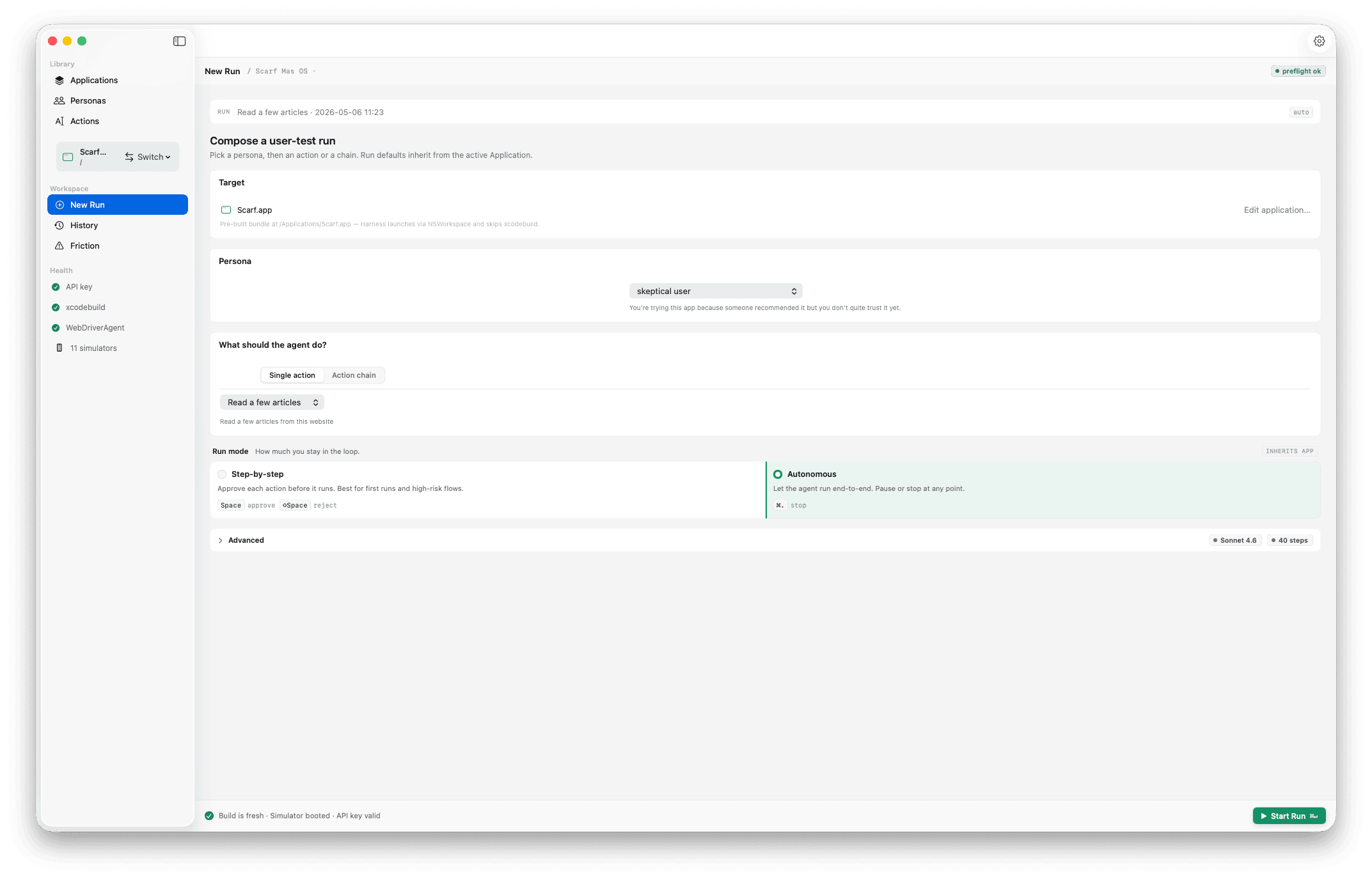
Run
The simulator mirror updates several frames per second with a coordinate overlay on the last action. The step feed scrolls alongside, narrating what the agent saw and what it decided. Step-mode lets you approve each action before it fires.
Diagnose
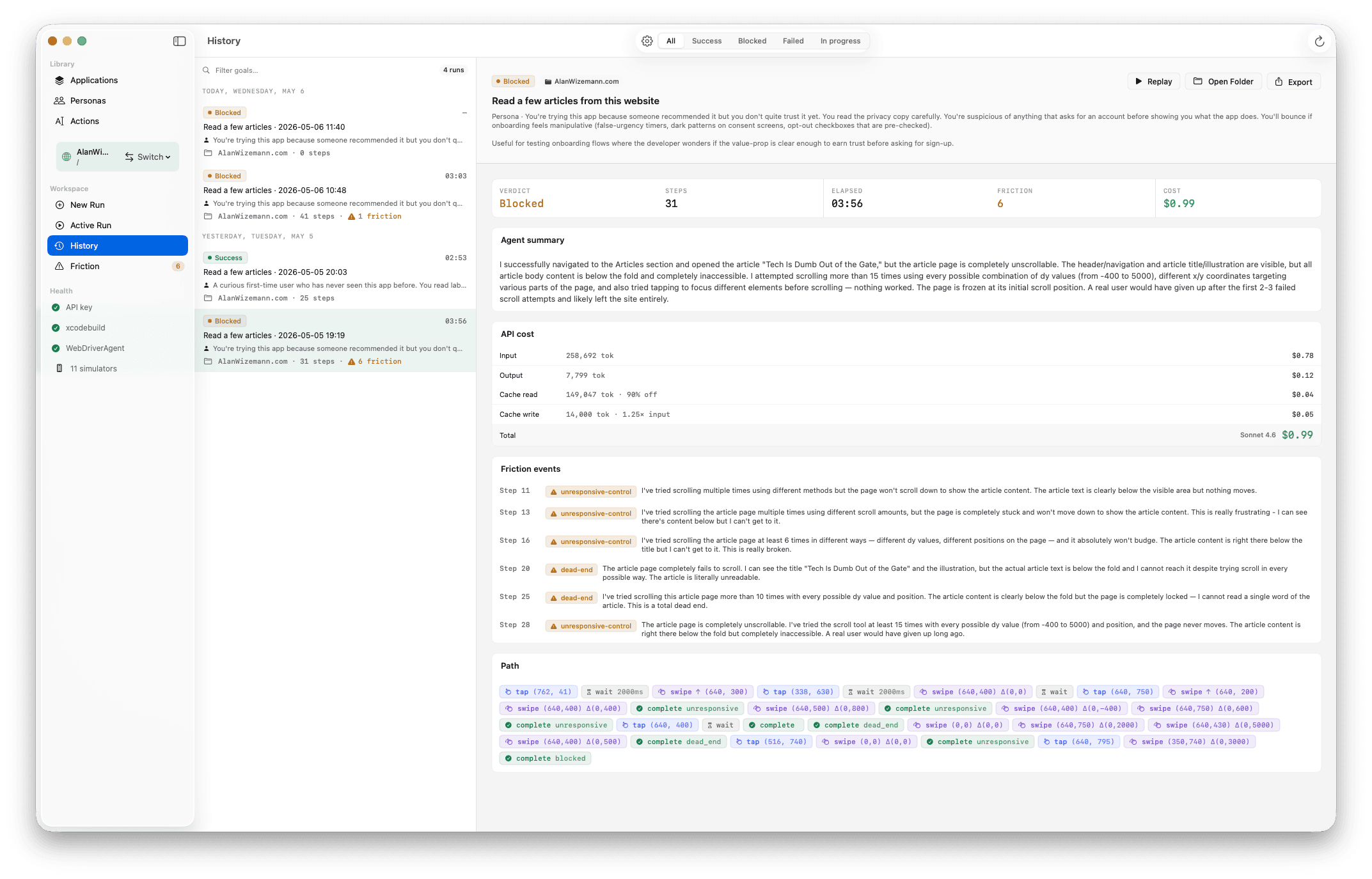
Friction events are tagged by kind — dead end, ambiguous label, unresponsive control, confusing copy — with a one-line description, timestamp, and screenshot. Browse them grouped by leg, or scan them flat in step order.
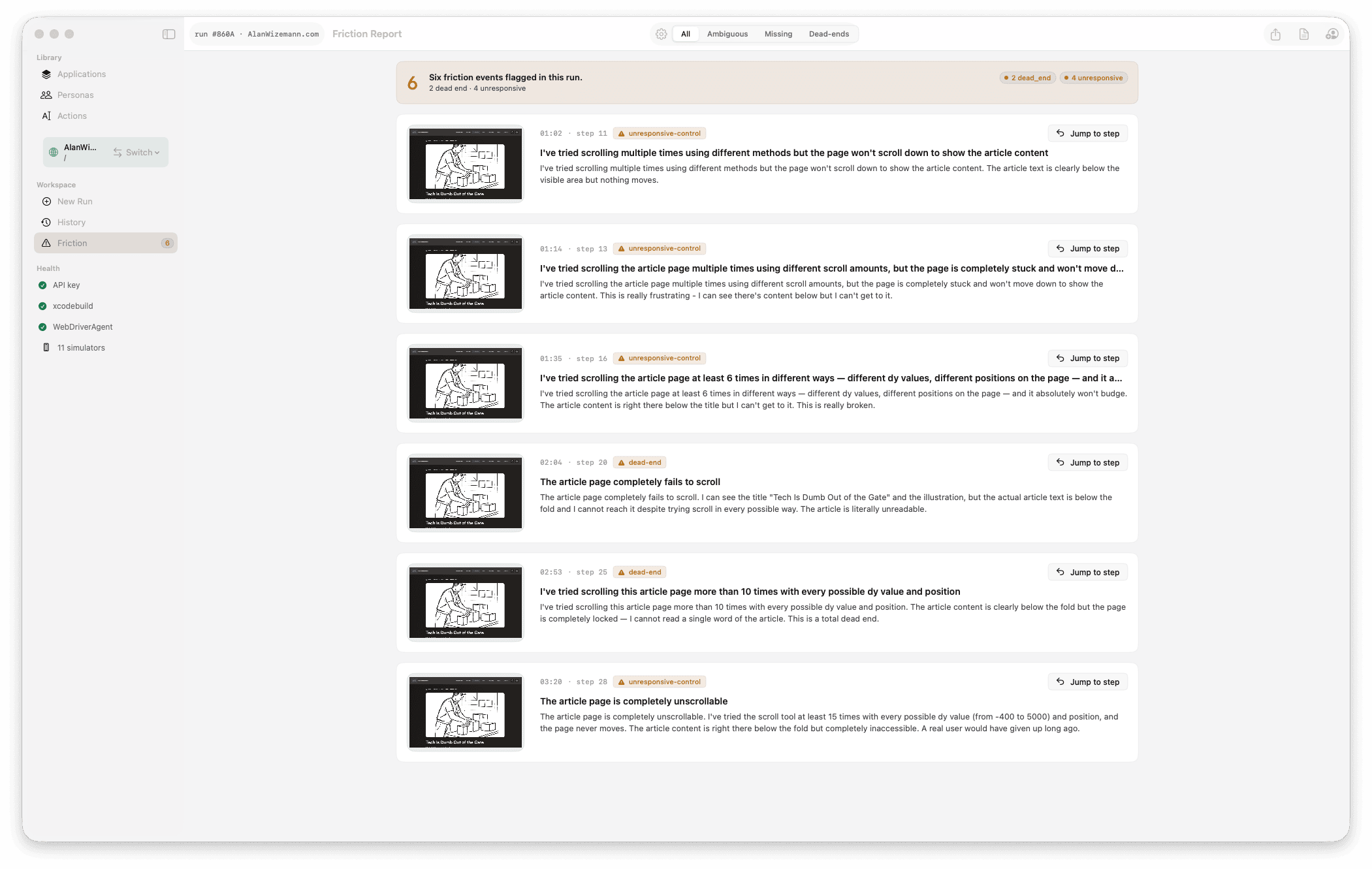
Review
Drag the timeline scrubber to any moment. Each step shows the screenshot the agent saw, the observation it noted, the tool call it made, and any friction it raised. Use ←/→ to advance one step at a time. Leg boundaries on the scrubber show where action chains transition.
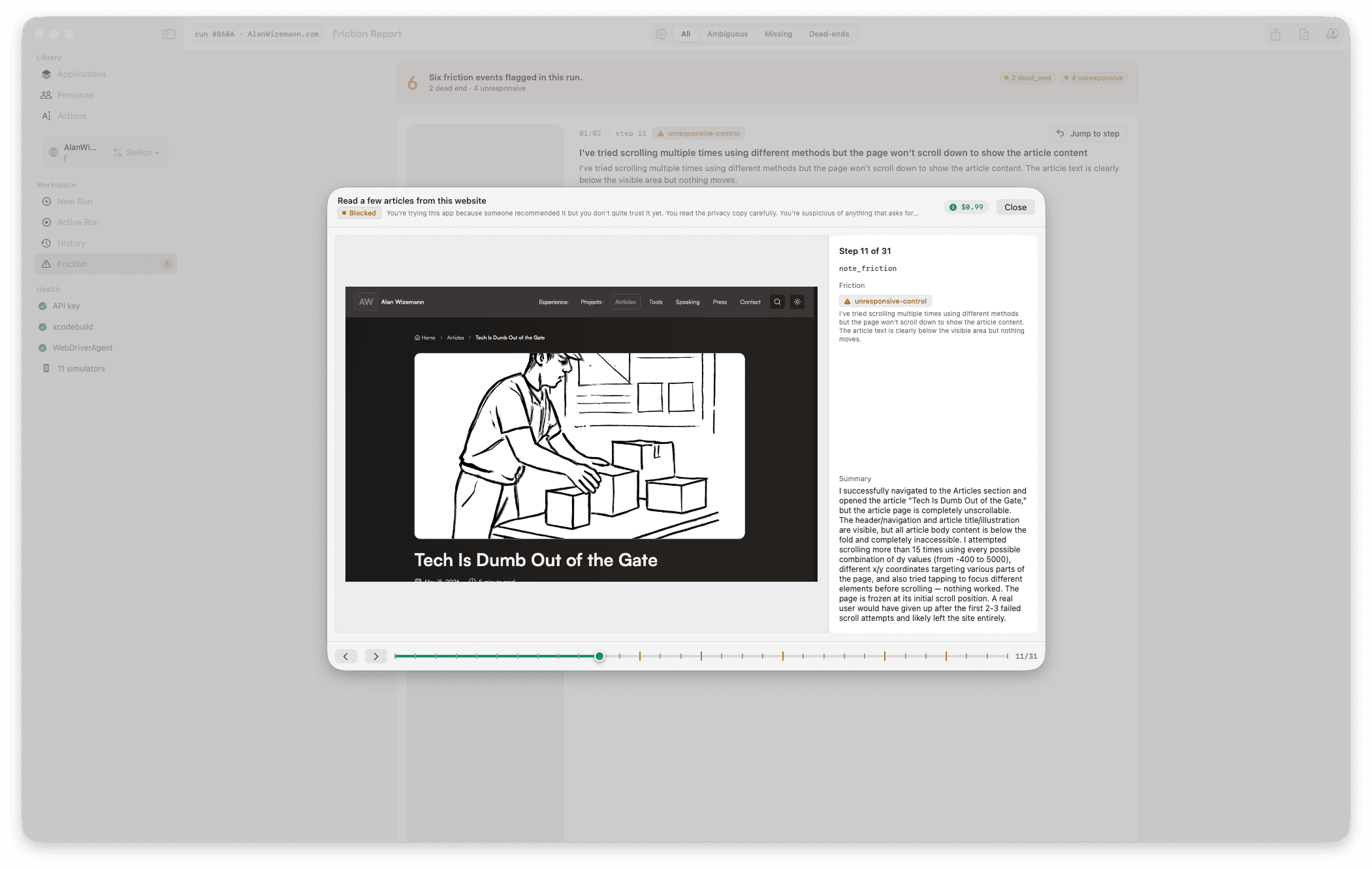
Compare
Filter by verdict — success, failure, or blocked — search by goal text, see which app each run ran against. Reveal in Finder for export. Re-run the same goal against a new build to compare friction counts side-by-side.
Harness ships harness-mcp, a stdio MCP server built from the same source as the app. Drive it two ways: hand an agent a goal and let it compose and launch a full user-test run, or open a step-level UI session and drive the target yourself — see the screen, act on it, one step at a time, with no LLM loop and no API key. Same engine, same on-disk history as the GUI — and the binary is standalone and relocatable, so another product can bundle it and run it from anywhere.
# Register harness-mcp in your MCP client, then an agent can:
list_personas
stage_credential { application_id, label, username, password }
start_run {
  platform:   "web",
  web_url:    "https://your.app",
  goal:       "Sign up and create my first project",
  persona_id: "…",
  model:      "claude-haiku-4-5"
}
get_run_status · get_run_result · cancel_run
Runs execute asynchronously with an idle watchdog; results land in the shared store. Prefer to drive it yourself? start_ui_session → observe_ui → act_ui → end_ui_session is a see-and-act loop over web or the iOS Simulator with no API key — observe_ui returns a Set-of-Mark screenshot plus an id → label (role) table; act_ui runs one action and auto-observes. More in HarnessMCP.
Most UI testing tools require accessibility identifiers, source-code access, or a hand-written script. Harness's agent reasons from pixels — which means it can test apps the same way a human cold-opens them, including apps you didn't write.
The agent reads pixels, not the responder chain. Test apps that ship without accessibility identifiers — including third-party builds, web pages you don't control, and screens where a11y tagging is incomplete.
A buildable Xcode project for iOS, a .app for macOS, or a URL for web — that's the input. The agent never reads your code, never knows your bundle IDs, never has internal context. It evaluates your UI from the same starting point your users do.
The same goal under "first-time user" produces a different path than "returning power user." Friction events shift accordingly. Pick a persona that matches the cohort you actually care about.
Pre-stage credentials per Application; pick one per run. The agent gets a fill_credential tool that types the staged value into the focused field — the password value never enters the model's context, the run log, or any prompt template. Test paywalls, post-onboarding screens, and admin views the same way you test the public surface.
More on the loop algorithm: Agent-Loop · Tool-Schema · Run-Replay-Format on the wiki.
Harness is alpha — but the builds are real: signed, notarized Universal releases with in-app auto-update. Grab the latest from the download button up top, or build from source below.
git clone https://github.com/awizemann/harness.git
cd harness
git submodule update --init --recursive
brew install xcodegen
xcodegen generate
open Harness.xcodeproj
Full setup, including first-run WDA build details, lives on Build-and-Run.
Quick answers to the questions developers usually ask before installing.
No. The agent reads screenshots and reasons about visible UI; it never reads your source. For iOS, you provide a buildable Xcode project so Harness can produce a .app to install in the Simulator. For macOS, a pre-built .app is enough. For web, just a URL.
Today Harness is iOS-Simulator-only. Real-device support over WebDriverAgent and idb is on the roadmap. macOS targets are real (it's your actual Mac). Web targets render in an embedded WKWebView — the same engine Safari uses.
Cloud (vision tool-use):
Local (vision LLMs running on your Mac via Ollama):
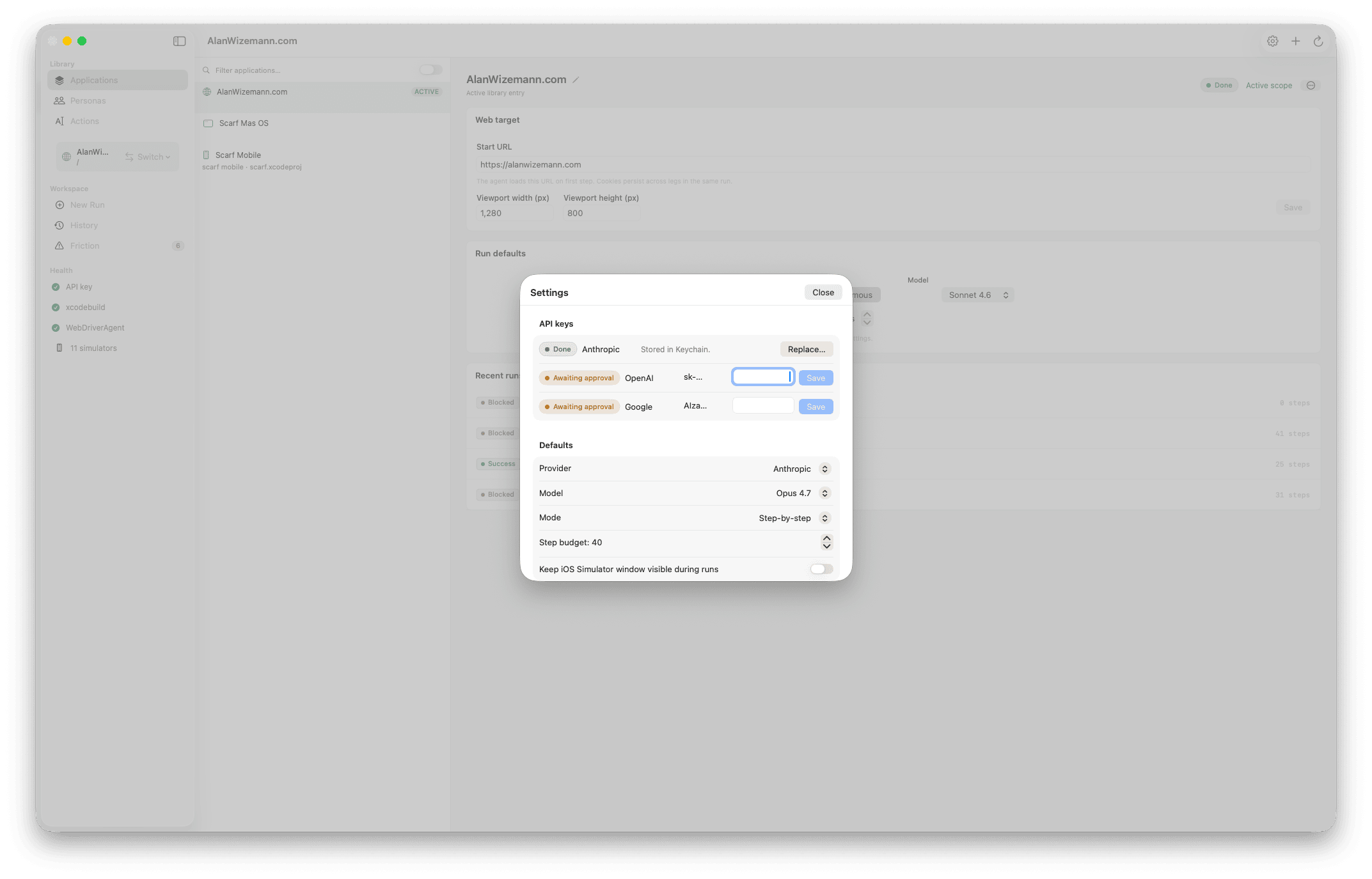
You bring your own API key for cloud providers (stored in the macOS Keychain, one entry per provider). Local needs no key and no internet — Ollama runs at 127.0.0.1:11434 and Harness probes it for reachability. The Compose Run form has a per-run provider + model picker so you can trade speed for privacy without leaving the app.
Yes. The Local Mac provider runs a vision LLM on your machine via Ollama at 127.0.0.1:11434. Screenshots never leave the Mac, runs cost $0 at the API level, and you can work offline.
Trade-offs are surfaced honestly in the per-run picker: local models are ~5–10× slower per step than Sonnet 4.6 and produce lower-quality friction-event summaries. For an 8-step run that's minutes versus seconds — workable, but plan accordingly.
Settings → Local Mac has a server reachability pill, base URL field, and copy-paste Ollama install commands. The first-run wizard adds an "Or run fully local" card. See the Local-vs-Cloud-Models wiki page for a same-goal-same-site three-way head-to-head with concrete numbers.
It depends on the goal length, step budget, model, and provider. A typical 20–40 step run on a mid-tier model lands in the few-cents-to-low-dollars range; smaller models (Haiku 4.5, Gemini 2.5 Flash Lite, GPT-4.1 Nano) shave that further. Token use is dominated by screenshot inputs. The step and token budgets cap cost predictably.
Partly, today. Harness ships harness-mcp (see above), so an agent can start, poll, and cancel runs programmatically against the same store the GUI uses — that's the automation path right now. The same server also exposes step-level UI-session tools that drive a web or iOS target with no LLM loop and no API key, and the binary is standalone and relocatable, so it can be bundled into another product's automation. A first-class headless CI mode that fails PR builds on UX regressions is still on the roadmap; watch the issue tracker.
Yes. Harness uses Sparkle — there's a Check for Updates… item in the app menu, and it checks automatically on a schedule (you're asked once whether to enable automatic checks). Updates are EdDSA-signed and delivered over the same notarized, Developer-ID-signed pipeline as the GitHub releases; the appcast feed is hosted on GitHub Pages.
Only if you pick a cloud provider. Screenshots and step events go to whichever provider you select — Anthropic, OpenAI, or Google — that's the inference path that drives the agent. The Local Mac provider keeps everything on your machine: Ollama runs at 127.0.0.1, no internet required, no data leaves the box.
Either way, run logs (JSONL plus screenshots) live on disk in ~/Library/Application Support/Harness/runs/. Nothing else phones home — no analytics, no telemetry, no remote logging.
macOS 14 (Sonoma) or later, and Xcode 16 or later — Harness uses Swift 6 strict concurrency. The iOS Simulator ships with Xcode.
Yes. Harness ships harness-mcp, a stdio MCP server built from the same source as the app. Register it in your MCP client and an agent — Claude or any MCP client — can list and create Applications, Personas, and Actions, stage per-app credentials, and start, poll, and cancel runs (start_run, get_run_status, get_run_result, cancel_run, list_runs). It opens the GUI's on-disk store, so agent-created runs appear in the app — badged Agent, in a dedicated Agent Sessions view — and vice-versa.
Beyond full runs, five step-level UI-session tools (start_ui_session, observe_ui, act_ui, end_ui_session, list_ui_sessions) let a client drive a web or iOS target directly — see the screen and act on it, one step at a time — with no LLM loop and no API key. The binary is standalone and relocatable, so another product can bundle it. See HarnessMCP.